Automatic Polarity Reverse without Arduino for MicroServo Control

Ya’akov

Joined Jan 27, 2019
10,240
I buy Nanos from AliExpress for $3.23CD (including shipping). I have never had a bad component yet. They have a USB interface for plugging into the computer to downlod programs direct.
He was particularly concerned about size and environmental shielding.

However, I will leave you to help. Conflicting advice is never useful.
 

Ya’akov

Joined Jan 27, 2019
10,240
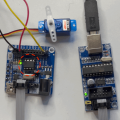
Not advocating but I wanted to say I jwas curious how hard it would be to use the Arduino IDE to make an ATTiny oscillate a servo so I gave it a try.

I used the even cheaper and less capable ATTiny 13a because that's what I had handy, Works like a champ. Now it would only need a resistor and a cap to be moved to another board and do its thing.

So, it's an option and I am really not sure how hard to would be for a neophyte to do. I sometimes have trouble judging that and so I defer to others if they feel strongly about it.

servo.png
sorry about the crappy PNG, I can't upload videos
 

KeithWalker

Joined Jul 10, 2017
3,607
Let us review your requirements before you make your final decision.
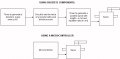
You need to move a servo arm from one position to another.
When the servo reaches the second position you need it to return to the first.
You need it to rotate slower than in a standard R/C system.
Here are your hardware requirements:

Servo.jpg
If you use a microcontroller, which, hardware wise would be much simpler, this is what the software needs to do:
Generate a number of positive pulses on a a digital pin - The length of the pulse will determine the first servo position.
Repeat the pulse at a the required repetition rate to set the speed of the servo (something more than 18mS).
When the number of generated pulses reaches the required number, the pulse length must change to drive the servo to the second position. Then the whole cycle is repeated.

Don't use servo libraries. They are designed to drive servos at the normal speed, which is not what you want.

You can use an ATTiny85 if you are prepared buy a programmer and invest the time needed learn how to use it. The ATTiny85 is available in an 8 pin DIP package which is aproximately 1cm square. The tiny will need a 3.3V power supply and may need the output pulses amplifed to 5V.
A simpler alternative would be a 5V Arduino Nano which has a USB connector to plug into a computer to download the program. It is much larger than the Tiny but it is still only 4.5cm x 2cm and the digital pins will switch between +5V and 0V..
 

djsfantasi

Joined Apr 11, 2010
9,237
Don't use servo libraries. They are designed to drive servos at the normal speed, which is not what you want.
Don’t take from this quote that servo libraries CANNOT be used. You can write your own code using a servo library function to move the servo arm at any speed. You just have to calculate the time spent at intermediate positions and code yourself the delays needed at each position for a given speed.
 

KeithWalker

Joined Jul 10, 2017
3,607
Don’t take from this quote that servo libraries CANNOT be used. You can write your own code using a servo library function to move the servo arm at any speed. You just have to calculate the time spent at intermediate positions and code yourself the delays needed at each position for a given speed.
Yes, you can do that but it adds an extra loop to the software to step the servo. It's a lot simpler to just switch a digital pin high and low using delays for the pulse width and pulse spacing.
 

djsfantasi

Joined Apr 11, 2010
9,237
Yes, you can do that but it adds an extra loop to the software to step the servo. It's a lot simpler to just switch a digital pin high and low using delays for the pulse width and pulse spacing.
I don’t understand what you’re saying… Using the library only requires one loop. Code is very simple.

Code:
// Demo
#include <servo.h>

const int sPin = 10;
const int sMax = 180;
const int sMin = 0;
const int sSpd = (some value);

setup () {
servo.attach (sPin);
}

loop() {
int sPos = 0;

// Move servo from 0 to 180 degrees
// and back perpetually

while() {
    servo.write(sPin,sPos);
    delay(sSpd);

    if (sPos == sMin) sDir=+1;
    if (sPos == sMax) sDir=-1;
    sPos = sPos + sDir;
}
 

KeithWalker

Joined Jul 10, 2017
3,607
I don’t understand what you’re saying… Using the library only requires one loop. Code is very simple.
I was not aware of that. I always found it so simple to write highs and lows to servos that I never played with servo.h.
This is how I would do it:

//This program will sweep a servo attached to pin 9

int pos = 1;

void setup(){
pinMode (9, OUTPUT);
digitalWrite (9, LOW);}

void loop () {
for (pos = 500; pos <= 2500; pos += 10) { // from 0 degrees to 180 in 50 steps
{ servo();}}

for (pos = 2500; pos >= 500; pos -= 10) { // from 180 degrees to 0 degrees
{ servo();}}
}

void servo() {
for (int i = 0; i <4; i += 1) // send 4 pulses to make sure servo gets there
digitalWrite(9, HIGH); // send a positive pulse to the servo
delayMicroseconds (pos);
digitalWrite (9, LOW);
delay(30); } // delay needed between pulses}
 
Last edited:

djsfantasi

Joined Apr 11, 2010
9,237
I was not aware of that. I always found it so simple to write highs and lows to servos that I never played with servo.h.
This is how I would do it:

//This program will sweep a servo attached to pin 9

int pos = 1;

void setup(){
pinMode (9, OUTPUT);
digitalWrite (9, LOW);}

void loop () {
for (pos = 500; pos <= 2500; pos += 10) { // from 0 degrees to 180 in 50 steps
{ servo();}}

for (pos = 2500; pos >= 500; pos -= 10) { // from 180 degrees to 0 degrees
{ servo();}}
}

void servo() {
for (int i = 0; i <4; i += 1) // send 4 pulses to make sure servo gets there
digitalWrite(9, HIGH); // send a positive pulse to the servo
delayMicroseconds (pos);
digitalWrite (9, LOW);
delay(30); } // delay needed between pulses}
I thought you may not have been familiar with the servo library. That’s why I thought a quick example might be of some value.

I’ve controlled servos manually by bit banging the control waveform. But that method is hardware dependent (because of various clock speeds) and also is difficult to use when other tasks must be performed in parallel.

The servo library as well as most of the other Arduino libraries, take care of the coding details for the programmer and allow for simple implementations of complex tasks.
 
Top