AT89S52 UART Code – Info in Datasheet

Thread Starter

Embededd

Joined Jun 4, 2025
131
Hey mate!

I want to send data from an AT89S52 to my laptop over UART. I was going through the AT89S52 datasheet to figure out how to write my own UART code but I couldn’t really find detailed info about UART in there. https://ww1.microchip.com/downloads/en/DeviceDoc/doc1919.pdf

Could you tell me if I should stick to the AT89S52 datasheet, or is it okay to refer to the AT89C51 datasheet instead https://ww1.microchip.com/downloads/en/DeviceDoc/doc4180.pdf? I noticed they look kinda similar, so I’m a bit confused.
 

sagor

Joined Mar 10, 2019
1,046
The 89S52 datasheet itself says to use the 89C51 or 89C52 datasheet for UART info. From page 11 of your own document:
"The UART in the AT89S52 operates the same way as the UART in the AT89C51 and AT89C52.
For further information on the UART operation, please click on the document link below:
http://www.atmel.com/dyn/resources/prod_documents/DOC4316.PDF"
(though that link seems to be broken for me... use the one you have...)
 

Thread Starter

Embededd

Joined Jun 4, 2025
131
What do you need to know about the UART?
I want to understand what UART settings I should choose and why. For example, I want to send data from my MCU to a laptop over UART. I'm using an RS232-to-USB converter, and the cable length is around 2 meters.

Now, should I select a baud rate of 115200 or 9600? I feel like 115200 would be better since it would allow data to be transmitted faster. But in what situations can a high baud rate like 115200 fail?

Specifically, I want to know: at what cable length or under what conditions would 115200 become unreliable?

So basically, I want to understand the trade-offs between baud rate and reliability, especially considering factors like cable length, and communication speed.
 

Papabravo

Joined Feb 24, 2006
22,058
I want to understand what UART settings I should choose and why. For example, I want to send data from my MCU to a laptop over UART. I'm using an RS232-to-USB converter, and the cable length is around 2 meters.

Now, should I select a baud rate of 115200 or 9600? I feel like 115200 would be better since it would allow data to be transmitted faster. But in what situations can a high baud rate like 115200 fail?

Specifically, I want to know: at what cable length or under what conditions would 115200 become unreliable?

So basically, I want to understand the trade-offs between baud rate and reliability, especially considering factors like cable length, and communication speed.
I would get things working at the lower rate of 9600, and then switch to 115,200 when you get things working. A cable length f 10' should be sufficient for both. The USB cable can be longer. USB 2.0 runs at 12 MHz. so it is plenty fast enough for RS232-conversion.
 

Jon Chandler

Joined Jun 12, 2008
1,560
I'm using an RS232-to-USB converter, and the cable length is around 2 meters.
The UART signals from the micro are at the Vcc level of the micro, usually 3.3V or 5V. This is not the level RS-232 wants, and the signals are inverted.

Instead of a USB-RS-232 converter, you need a USB-TTL level converter or a MAX232 conversion chip on the micro board.

I like the CH340 USB-UART converters, which can be had for a few bucks.
 

Thread Starter

Embededd

Joined Jun 4, 2025
131
I would get things working at the lower rate of 9600, and then switch to 115,200 when you get things working. A cable length f 10' should be sufficient for both. The USB cable can be longer. USB 2.0 runs at 12 MHz. so it is plenty fast enough for RS232-conversion.
Just wanted to share what I did with the AT89S52 using Keil. I wrote a simple UART program to send and receive characters but I’ve run into a small issue.

Problem is I don’t see "hello" appearing on the terminal. The echo part seems to work once I send data from the terminal, but the initial string never shows up.

I even tried adding a longer delay after sending the string, just to make sure it wasn’t getting cut off too early, but still no luck.


Tarminal Output.png
Just wondering am I missing something in the program?

C:
#include <AT89X52.h>

void Delay_ms(unsigned int ms) {
    unsigned int i, j;
    for (i = 0; i < ms; i++)
        for (j = 0; j < 1275; j++);  // Approx 1ms delay @11.0592MHz
}

void Uart_initialize() {
    TMOD = 0x20;    // Timer 1, Mode 2 (Auto-Reload)
    TH1 = 0xFD;     // 9600 baud @11.0592MHz
    SCON = 0x50;    // Serial Mode 1, Enable Reception
    TR1 = 1;        // Start Timer
}

void Send_Data(char c) {
    SBUF = c;
    while (!TI);    // Wait for transmit complete
    TI = 0;         // Clear flag
}

void Send_String(char *s) {
    while (*s) {
        Send_Data(*s++);
    }
}

void main() {
    Uart_initialize();
    Delay_ms(100);      // Wait for UART & terminal to stabilize
    Send_String("Hello");

    
    while (1) {
        if (RI) {       // If data received
            char c = SBUF;
            RI = 0;     // Clear receive flag
            Send_Data(c); // Echo back
        }
    }
}
 

Ya’akov

Joined Jan 27, 2019
10,226
The echo part seems to work [...]
If you have local echo turned on it will show what you type entirely on the terminal side. You need to confirm you have communication from the MCU to the PC.

Check the wiring to be sure you have TX→RX and not TX→TX. Try using a loopback on the MCU side and see it if receives its own transmission.

As @Jon Chandler pointed out, above UART ≠ RS-232. You either need an RS-232←→UART adapter on the MCU UART or a USB←→UART adapter on the PC.
 

Thread Starter

Embededd

Joined Jun 4, 2025
131
You either need an RS-232←→UART adapter on the MCU UART or a USB←→UART adapter on the PC.
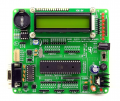
I’ve attached a snap of my board. Could you please check and let me know which one it is in my case? Whether it’s RS-232 -UART or USB-UART?

I believe it’s RS-232 -UART, but just wanted to confirm with you to be sure I’m not missing anything.

1750420054137.png
 

Jon Chandler

Joined Jun 12, 2008
1,560
The 60 second guide to making RS232 work:

● 3 pins are key
– Pin 5 is common, usually called ground
–"Pins 2 and 3 are transmit and receive. The problem is both ends may not agree as to how they should be connected.
Tx ——> Rx
Rx ——> Tx
Transmit from each device must be connected to Receive on the other.

In days past, I had a very good book on RS232 interfacing. The first piece of advice was:

Throw away the manufacturer's documentation. It's often wrong.

Measure between pin 5 and pin 2 and between pin 5 and pin 3 on each end. Either pin 2 or pin 3 should be around +12v (pretty wide range), and the other should be very close to zero volts.

Connect the +12v pin (transmit line) from one end to the pin near 0 (receive line) on the other and the same in the other direction.

With some luck, you end up with:
Pin 2 <——> pin 3
Pin 3 <——> pin 2
Pin 5 <——> pin 5 common connection

If the DB9 connectors are opposite sex, you're good to go. If not, see below.


But you may end up with this:
Pin 2 <——> pin 2
Pin 3 <——> pin 3
Pin 5 <——> pin 5 common connection

If this is the situation, you can't just plug the DB9 connectors together.

If the pins need to be swapped or the connectors don't mate, you may need a null modem cable (swaps pins 2 & 3), a "gender-bender" adapter (connects connectors of the same sex together) or even both. It may be easiest to get the connectors you need and solder the appropriate cable together.

I don't think hardware handshaking is much used in microcontroller interfaces. If it's an option, turn it OFF.

Next up are the baud rate and interface settings. Both ends must agree. If you get nothing or see scrambled characters, improper settings are usually the problem if connections are made as explained above.

Baud rate is how fast data is sent. 9600 or 115,200 are common settings. This must be set in your micro code and in the port settings on the pc.

Data format (also set in code and port settings on the pc) must also agree. These days, practically everything uses:

8 N 1

8 = number of data bits

N = no parity

1 = number of stop bits.

Hope this helps.
 

Thread Starter

Embededd

Joined Jun 4, 2025
131
But just to clarify so when I type something in the terminal (e.g., Tera Term ) , it gets echoed back correctly by the MCU. Doesn’t that indicate the hardware connections are okay and the basic communication is working, and the issue might be more on the program
 

Thread Starter

Embededd

Joined Jun 4, 2025
131
Is it being echoed back by the MCU, or is local echo turned on in the terminal program? If you disconnect the RS232 adapter, is it still "echoed back"?
I have verified it by disconnecting the RS-232 adapter, and when I typed something in the terminal, nothing came back — the terminal stayed blank. Once I reconnected it, the characters I typed started getting echoed again.

So I’m confident the data is going to the MCU and coming back from it, which I think confirms that the hardware wiring and UART communication are working fine. The only thing still odd is that the initial string doesn’t show up when the MCU starts
 
Top