Arduino project - connecting to server followed by immediate disconnect

Thread Starter

Elektrishun

Joined Dec 27, 2016
66
I have been attempting to get this Arduino Wifi project working:

https://openhomeautomation.net/monitor-your-home-remotely-using-the-arduino-wifi-shield/

I am new to programming micro-controllers but I feel this project is close to being successfull. The gist of it is that I can use my Arduino Uno (Rev 3) and Wifi Shield to monitor a door alarm. With the Arduino connected to my wireless network I should be able to use the board's IP address with a web browser (I have mainly used Chrome but tried Firefox, too) and see whether the door is opened or closed. The main issue is that I have only successfully done this once in numerous attempts (I seen the message "Alert! The door has been opened" for a brief second or two using Chrome web browser).

I believe that the main issue is that I am connecting and then disconnecting almost immediately from the server. But why? The one time I had that momentary success I had followed advice on a website that suggested that I go to Programs -> Java -> Temporary Internet Files -> Settings -> Restore Defaults -> Delete Files. That hasn't yielded the same positive results since.

I am using Windows 7 Professional with Arduino IDE 1.0.2 (I have read in numerous threads that this version works best with the Wifi Shield and I've already gone the other route with updating the IDE and Wifi firmware with overall less connection success despite a successful updating of the firmware).

Any suggestions would be greatly appreciated.
 

Thread Starter

Elektrishun

Joined Dec 27, 2016
66
I used this Arduino Wifi sample code which is similar to the other code in what it attempts to do:

https://www.arduino.cc/en/Tutorial/WiFiWebServer

The code works fine. In the Programmer's Serial Monitor I see the following:

Attempting to connect to SSID: "my network name"
SSID: "my network name"
IP Address: ###.###.#.##
signal strength (RSSI):-83 dBm


But when I use the Arduino Wifi Shield's IP address in Chrome the Programmer's Serial monitor it continues with:

new client
yclient disconnected
new client
GETclient disconnected
new client
client disconnected

Edit: Fixed above link
 
Last edited:

djsfantasi

Joined Apr 11, 2010
9,237
Ethernet is not a stateful protocol. What you are seeing is exactly what is expected, depending on what packets the code communicates.

Why your message disappears depends on your code. Instead of posting what the code is based on, post your code

(use CODE tags,
"[ CODE]" and "[ /CODE]".
No spaces)
 

Thread Starter

Elektrishun

Joined Dec 27, 2016
66
This is the code for the WiFi Web Server from the Arduino WiFi Shield examples page:

C:
/*
WiFi Web Server

A simple web server that shows the value of the analog input pins.
using a WiFi shield.

This example is written for a network using WPA encryption. For
WEP or WPA, change the Wifi.begin() call accordingly.

Circuit:
* WiFi shield attached
* Analog inputs attached to pins A0 through A5 (optional)

created 13 July 2010
by dlf (Metodo2 srl)
modified 31 May 2012
by Tom Igoe

*/

#include <SPI.h>
#include <WiFi.h>


char ssid[] = "yourNetwork"; // your network SSID (name)
char pass[] = "secretPassword"; // your network password
int keyIndex = 0; // your network key Index number (needed only for WEP)

int status = WL_IDLE_STATUS;

WiFiServer server(80);

void setup() {
//Initialize serial and wait for port to open:
Serial.begin(9600);
while (!Serial) {
; // wait for serial port to connect. Needed for Leonardo only
}

// check for the presence of the shield:
if (WiFi.status() == WL_NO_SHIELD) {
Serial.println("WiFi shield not present");
// don't continue:
while(true);
}

// attempt to connect to Wifi network:
while ( status != WL_CONNECTED) {
Serial.print("Attempting to connect to SSID: ");
Serial.println(ssid);
// Connect to WPA/WPA2 network. Change this line if using open or WEP network:
status = WiFi.begin(ssid, pass);

// wait 10 seconds for connection:
delay(10000);
}
server.begin();
// you're connected now, so print out the status:
printWifiStatus();
}


void loop() {
// listen for incoming clients
WiFiClient client = server.available();
if (client) {
Serial.println("new client");
// an http request ends with a blank line
boolean currentLineIsBlank = true;
while (client.connected()) {
if (client.available()) {
char c = client.read();
Serial.write(c);
// if you've gotten to the end of the line (received a newline
// character) and the line is blank, the http request has ended,
// so you can send a reply
if (c == '\n' && currentLineIsBlank) {
// send a standard http response header
client.println("HTTP/1.1 200 OK");
client.println("Content-Type: text/html");
client.println("Connection: close"); // the connection will be closed after completion of the response
client.println("Refresh: 5"); // refresh the page automatically every 5 sec
client.println();
client.println("<!DOCTYPE HTML>");
client.println("<html>");
// output the value of each analog input pin
for (int analogChannel = 0; analogChannel < 6; analogChannel++) {
int sensorReading = analogRead(analogChannel);
client.print("analog input ");
client.print(analogChannel);
client.print(" is ");
client.print(sensorReading);
client.println("<br />");
}
client.println("</html>");
break;
}
if (c == '\n') {
// you're starting a new line
currentLineIsBlank = true;
}
else if (c != '\r') {
// you've gotten a character on the current line
currentLineIsBlank = false;
}
}
}
// give the web browser time to receive the data
delay(1);

// close the connection:
client.stop();
Serial.println("client disonnected");
}
}


void printWifiStatus() {
// print the SSID of the network you're attached to:
Serial.print("SSID: ");
Serial.println(WiFi.SSID());

// print your WiFi shield's IP address:
IPAddress ip = WiFi.localIP();
Serial.print("IP Address: ");
Serial.println(ip);

// print the received signal strength:
long rssi = WiFi.RSSI();
Serial.print("signal strength (RSSI):");
Serial.print(rssi);
Serial.println(" dBm");
}
 
Last edited:

djsfantasi

Joined Apr 11, 2010
9,237
Sigh. It is hard to help when you cannot read a post.

First, the code tags have NO SPACES.

Second, example code is useless. We need to see the code that you modified.

Note: TS fixed code tags
 
Last edited:

Thread Starter

Elektrishun

Joined Dec 27, 2016
66
The example code is what I used to demonstrate what was happening. There was no modification other than inserting my network name and password where it was required.
 

Thread Starter

Elektrishun

Joined Dec 27, 2016
66
This is the code from the project that I linked to in post #1:

C:
#include <SPI.h>
#include <WiFi.h>

char ssid[] = "yourSSID"; // your network SSID (name)
char pass[] = "yourPass"; // your network password

int status = WL_IDLE_STATUS;

boolean door_status = false;

WiFiServer server(80);

void setup() {
// start serial port for debugging purposes
Serial.begin(9600);

// Attach interrupt to pin 2
attachInterrupt(0, setDoorStatus, RISING);

// attempt to connect to Wifi network:
while ( status != WL_CONNECTED) {
Serial.print("Attempting to connect to SSID: ");
Serial.println(ssid);
status = WiFi.begin(ssid, pass);
// wait 10 seconds for connection:
delay(10000);
}
server.begin();
// you're connected now, so print out the status:
printWifiStatus();
}


void loop() {

// listen for incoming clients
WiFiClient client = server.available();
if (client) {
Serial.println("new client");
// an http request ends with a blank line
boolean currentLineIsBlank = true;
while (client.connected()) {
if (client.available()) {
char c = client.read();
Serial.write(c);
// if you've gotten to the end of the line (received a newline
// character) and the line is blank, the http request has ended,
// so you can send a reply
if (c == '\n' && currentLineIsBlank) {
// send a standard http response header
client.println("HTTP/1.1 200 OK");
client.println("Content-Type: text/html");
client.println("Connnection: close");
client.println();
client.println("<!DOCTYPE HTML>");
client.println("<html>");
client.println("<meta http-equiv=\"refresh\" content=\"5\">");

if (door_status == false){
client.print("Everything is ok");
}
else {
client.print("Alert ! The door has been opened");
}
client.println("<br />");
client.println("</html>");
break;
}
if (c == '\n') {
// you're starting a new line
currentLineIsBlank = true;
}
else if (c != '\r') {
// you've gotten a character on the current line
currentLineIsBlank = false;
}
}
}
// give the web browser time to receive the data
delay(1);
// close the connection:
client.stop();
Serial.println("client disonnected");
}
}


void printWifiStatus() {
// print the SSID of the network you're attached to:
Serial.print("SSID: ");
Serial.println(WiFi.SSID());

// print your WiFi shield's IP address:
IPAddress ip = WiFi.localIP();
Serial.print("IP Address: ");
Serial.println(ip);

// print the received signal strength:
long rssi = WiFi.RSSI();
Serial.print("signal strength (RSSI):");
Serial.print(rssi);
Serial.println(" dBm");
}

void setDoorStatus() {
door_status = true;
}
 

djsfantasi

Joined Apr 11, 2010
9,237
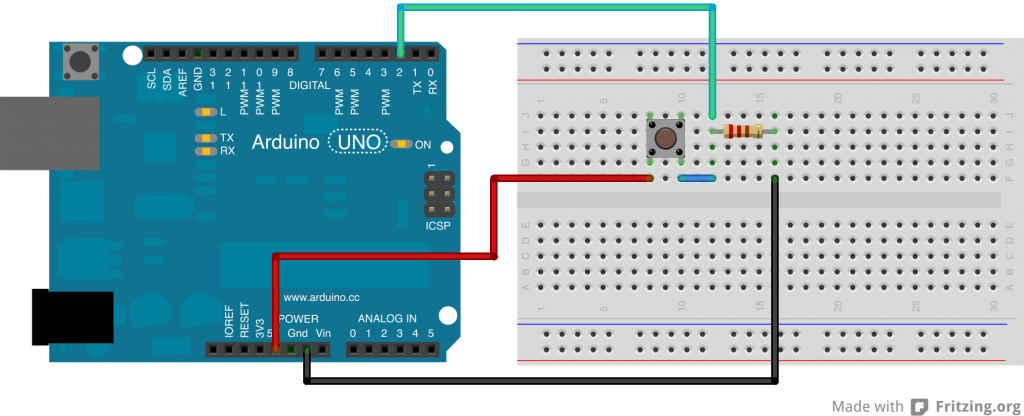
Ok, I see where you are setting the status of the door. The only place where this occurs is in your interrupt handler. Now, we need to verify that the interrupt routine is being triggered. To do that, for a moment we have to look at the hardware.

Please post a schematic of everything connected to pin 2. You may think this is an irrelevant request, but please humor me.

Thanks.
 

Thread Starter

Elektrishun

Joined Dec 27, 2016
66
This is the schematic I used which is posted on the page with the project:


Edit: This is probably insignificant but the project designer shows the Uno board in his schematic. I have the Wifi Shield connected atop the Uno board when I connect this circuit to the Wifi Shield.
 

djsfantasi

Joined Apr 11, 2010
9,237
Ok. At this point (or before), I would write a test sketch to verify that the interrupt is working. In setup, configure you serial output and setup the interrupt routine.

In the void function, I would print out a simple message to confirm that you entered the function.

Then, go into a do nothing loop.

Your interrupt routine should print out a message when executed.

Make sure that this works.
 

Thread Starter

Elektrishun

Joined Dec 27, 2016
66
Yes, in the project steps the author has this exact step which I completed successfully before moving on:

"Finally, let’s test the push button. We want to detect the state of the button, so we will use the function digitalRead(). Here is the sketch to test the button:"

Code:
// Push button pin
int pushButton = 2;

// Setup
void setup() {
Serial.begin(9600);
}

// Main loop
void loop() {

// read the pin number 2
int buttonState = digitalRead(pushButton);

// print out the state of the button
Serial.println(buttonState);
delay(1);
}
"Now upload the sketch, and open the serial monitor. You should see a lot of zeros, which is logical because the pin number 2 is connected to the ground. Then, just push the button, and if you see ones like on the following screenshot, it is all good."
 

djsfantasi

Joined Apr 11, 2010
9,237
I think I have noticed something. You haven't initialized pin 2. Before your statement to attach the interrupt, you need to initialize the pin. Use this line of code:
pinMode(2, INPUT);​
Try that.
 

Thread Starter

Elektrishun

Joined Dec 27, 2016
66
I must be doing something wrong - getting error "stray '\' in program".

Where exactly was I supposed to insert that line of code?
 

djsfantasi

Joined Apr 11, 2010
9,237
Insert the line before you call the attachInterrupt function.

Are you using the Arduino IDE? If so in the bottom window, where I expect you are getting that error message, should indicate the line with the "stray" error. There is a button in the IDE that will copy all errors to the clipboard. Then you can paste them into an editor to get a better look. I'll be honest, never saw that "stray" error.
 

Thread Starter

Elektrishun

Joined Dec 27, 2016
66
Not sure why it never compiled without error before but this time it did so without error.

Code:
#include <SPI.h>
#include <WiFi.h>

char ssid[] = "yourNetwork";     //  your network SSID (name)
char pass[] = "secretPassword";    // your network password

int status = WL_IDLE_STATUS;

boolean door_status = false;

WiFiServer server(80);

void setup() {
  // start serial port for debugging purposes
  Serial.begin(9600);
  pinMode(2, INPUT);

  // Attach interrupt to pin 2
  attachInterrupt(0, setDoorStatus, RISING);

  // attempt to connect to Wifi network:
  while ( status != WL_CONNECTED) {
    Serial.print("Attempting to connect to SSID: ");
    Serial.println(ssid);
    status = WiFi.begin(ssid, pass);
    // wait 10 seconds for connection:
    delay(10000);
  }
  server.begin();
  // you're connected now, so print out the status:
  printWifiStatus();
}


void loop() {
        
  // listen for incoming clients
  WiFiClient client = server.available();
  if (client) {
    Serial.println("new client");
    // an http request ends with a blank line
    boolean currentLineIsBlank = true;
    while (client.connected()) {
      if (client.available()) {
        char c = client.read();
        Serial.write(c);
        // if you've gotten to the end of the line (received a newline
        // character) and the line is blank, the http request has ended,
        // so you can send a reply
        if (c == '\n' && currentLineIsBlank) {
          // send a standard http response header
          client.println("HTTP/1.1 200 OK");
          client.println("Content-Type: text/html");
          client.println("Connnection: close");
          client.println();
          client.println("<!DOCTYPE HTML>");
          client.println("<html>");
          client.println("<meta http-equiv=\"refresh\" content=\"5\">");
      
            if (door_status == false){
              client.print("Everything is ok");
            }
            else {
               client.print("Alert ! The door has been opened");
            }   
          client.println("<br />");
          client.println("</html>");
           break;
        }
        if (c == '\n') {
          // you're starting a new line
          currentLineIsBlank = true;
        }
        else if (c != '\r') {
          // you've gotten a character on the current line
          currentLineIsBlank = false;
        }
      }
    }
    // give the web browser time to receive the data
    delay(1);
      // close the connection:
      client.stop();
      Serial.println("client disonnected");
  }
}


void printWifiStatus() {
  // print the SSID of the network you're attached to:
  Serial.print("SSID: ");
  Serial.println(WiFi.SSID());

  // print your WiFi shield's IP address:
  IPAddress ip = WiFi.localIP();
  Serial.print("IP Address: ");
  Serial.println(ip);

  // print the received signal strength:
  long rssi = WiFi.RSSI();
  Serial.print("signal strength (RSSI):");
  Serial.print(rssi);
  Serial.println(" dBm");
}

void setDoorStatus() {
  door_status = true;
}
After uploading the output in the Arduino IDE serial monitor was consistent. Once I tried connecting by entering the Sheild's IP address in Chrome's web browser it did the same as before:
"new client"
"client disconnected"
 
Last edited:

Thread Starter

Elektrishun

Joined Dec 27, 2016
66
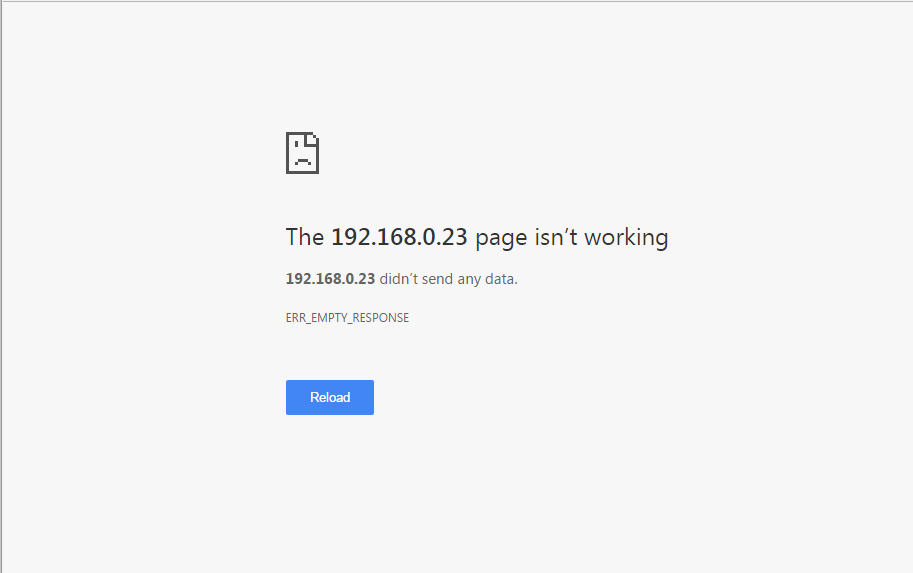
No.
The serial monitor shows that I tried connecting when entering the IP address in Chrome but the page itself shows following:


There was only one occasion where I got a brief glimpse of the alarm code before seeing the above result directly after.
 

djsfantasi

Joined Apr 11, 2010
9,237
What is your problem? I see two. One, you cannot connect to your PC. Second, your alarm code does not work. Is this correct?

I have been addressing the latter.

For the former, I will make some general comments. I can't see yet why you are not sending the HTTP response. I had a couple of thought, but couldn't support them. I might insert a serial.print immediately before you send the HTTP response.

Your screen shot indicates that the browser is not receiving the HTTP response. Let's find out why!
 
Top