Arduino: Pot, button, & switch all hooked to same ground wire, why such weird results?

Thread Starter

Ryq_

Joined Nov 5, 2016
5
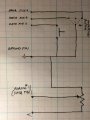
Hey. I have some Neopixels up and running on an adafruit Flora ("arduino"). Wanted to switch speed via a pot, switch "modes" using an on/off/on switch, and have a button kick off a particular sequence. The code works on each element individually.

However, combined they are interacting in weird ways. I have different data pins connected to each (two on the switch, one on wiper of pot, and one to the button). All then go directly to the same wire that goes back to ground. They seem to be affecting each other via the ground connection. Do I need to add a diode or something to keep them from interacting?

Thanks for your help in this matter.
 
Last edited:

crutschow

Joined Mar 14, 2008
38,324
Need a schematic of exactly how they are all connected.
If you have good ground connections, there should be no interaction.
 
Last edited:

Thread Starter

Ryq_

Joined Nov 5, 2016
5
I have attached a basic schematic of how I have it wired up. When looking at the serial monitor, I can see the value of the potentiometer (read from pin 11) jump values when I press the button.
 

Attachments

Alec_t

Joined Sep 17, 2013
15,104
Are you using internal pull-ups/downs on the Arduino? If not, you should have external ones to prevent the inputs 'floating', which can cause unpredictable results.
 

dannyf

Joined Sep 13, 2015
2,197
the pins with buttons should have pull-ups to help define their logic states. otherwise, they are floating and can take any value at any point.
 

ErnieM

Joined Apr 24, 2011
8,415
Yes, I used to the internal resistor to "debounce" the button.
Nah, that resistor just gives you a high signal when the button is not pressed.

Press the button just once and you can get lots and lots of bouncing.

You can see if they interact with just a voltmeter while ignoring whatever the code may be doing. I expect that to be just fine, unless you have a wiring error.

Once you are convinced the buttons are fine electrically look again at your code and imagine what happens if a button is pressed not once but over and over very rapidly... there lies what I suspect is your issue.
 

Thread Starter

Ryq_

Joined Nov 5, 2016
5
Once you are convinced the buttons are fine electrically look again at your code and imagine what happens if a button is pressed not once but over and over very rapidly... there lies what I suspect is your issue.
I checked this also with no code addressing the pin that the button is on though. I made simple sketch where the potentiometer changes some neopixels from red to green. It works fine. But when I push the button (which there is no code interested in its pin so should do nothing whether pushed once or rapidly), the value on the analog pin hooked to the pot wiper changes value and the color shifts (as does the value at the pots wiper when measured or monitored).

The wiring I am actually good at and I've checked more than once. It is good and exactly as pictured in the schematic I posted above.

Since it causes this shift consistently, even when there is no code regarding the pin that the button is connected to, do you still think the issue could be with the code?

Here is the test sketch for the potentiometer only controlling a shift from red to green:


#include <Adafruit_NeoPixel.h>
#ifdef __AVR__
#include <avr/power.h>
#endif
int potPin = 11;
int val = 0;
int finalVal;
Adafruit_NeoPixel back = Adafruit_NeoPixel(11, 6, NEO_GRBW + NEO_KHZ800);
void setup() {
// put your setup code here, to run once:
back.begin();
back.setBrightness(16);
Serial.begin(9600);
}
void loop() {
// put your main code here, to run repeatedly:
for(int i = 0; i < 11; i++) {
val = analogRead(potPin);
finalVal = map(val, 0, 1023, 1, 255);
Serial.println(finalVal);
back.setPixelColor(i, back.Color(finalVal, -finalVal, 0, 0));
back.show();
}
}
 

Thread Starter

Ryq_

Joined Nov 5, 2016
5
Ok folks, I feel like an huge idiot. I was using a metal mint tin for the enclosure. It seems this was shorting something out. Removing it from the enclosure has made everything to work as expected, even with the much more involved code (not just the test sketch I posted above).

Even the button functions flawlessly just as rapidly as I can press it, or if pushed once it only responds with a single push (not like it received a bunch of rapid signals due to bouncing, so the inernal resistor seems to debounce it enough).

Sorry for wasting everyone's time! Thanks for your input!
 

ErnieM

Joined Apr 24, 2011
8,415
I'm happy you got your project to work. No need to apologies about anything. We've all done something similar.

If I hadn't had the last 4 days off I'd have probably done something like that yesterday.
 
Top