Android Box PCB Problem

Thread Starter

Stephen Cullen

Joined Jul 29, 2017
11
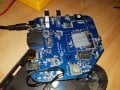
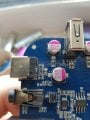
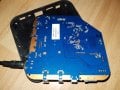
Hi. I have an MXQ android TV box that won't power on. The adapter is measuring 5v and when I plug it onto the box and check it at the input it's still 5v. Once I press the spring loaded switch to turn it on the voltages drops to 1v and just pulses up and down slightly about twice per second. Could this be a failing diode or something like that? I'm not sure if the wrong plug was used on it but I'm gonna guess since it would fit that somebody probably plugged a 12v adapter into it by mistake. Here's pictures of the PCB. Thanks.20170729_231555.jpg 20170729_231609.jpg
 

IMP002017

Joined Jan 28, 2017
192
Sadly these are one of the things that I call Consumables. They are cheap enough that if it blows up it is almost best to just toss and buy a new one...

Have you tried more then 1 PSU?
Did you test Shorts to Ground?
Did it drop once before, It looks like the heat shield has moved?
Have you looked over the board for bad parts and that all solder joints are well connected?

What have you done so far in Trouble shooting this problem?
 

DickCappels

Joined Aug 21, 2008
10,661
Sounds a lot like a near-dead short on the board. The pulsing is probably the power supply checking to see whether or not the excess load is still connected.
 

Thread Starter

Stephen Cullen

Joined Jul 29, 2017
11
Thanks for the replies. So far I've tried a different power supply and it still didn't work and I found out that using a USB a to a cable to power it through its USB makes the light on the optical audio output light up and the board starts getting warm but still no boot.
 

Thread Starter

Stephen Cullen

Joined Jul 29, 2017
11
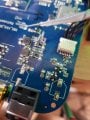
I'm not allowed edit the other post for some reason but I'm not getting any short to ground as far as I can tell. Here's a picture near the power input.20170730_131718.jpg
 

DickCappels

Joined Aug 21, 2008
10,661
Agreed,if you are seeing 1 volt it is not a short. It is almost a short at the power supply terminals and maybe much more of a short elsewhere. You might be able to track down the short by tracking the voltage drops in the power supply traces.

How many amps is that power supply good for? It is possible that by feeling around carefully (don't get burned) you can detect a hot part -that's probably a good clue.
 

IMP002017

Joined Jan 28, 2017
192
Sadly it is hard to tell by Pictures when I can't touch. With power on if things start to get Warm that sounds like a short. It could be much past the input of power. How did you look for a Short to Ground?

Do you have any 99% Alcohol? If you don't have Freeze Spray you can use the 99% Alc to show you where the board gets warm first. Dip your swab onto your Alcohol dispenser after getting some extra to the top. If there is a lot of area to cover I even use a Paper Towel if I need more then a Q-Tip can get. Cover the suspect area and you should see the spot that is getting warmed first Evaporate. Then you know that is the sight that needs more testing.
 

Thread Starter

Stephen Cullen

Joined Jul 29, 2017
11
20170730_172002.jpg
Sadly it is hard to tell by Pictures when I can't touch. With power on if things start to get Warm that sounds like a short. It could be much past the input of power. How did you look for a Short to Ground?

Do you have any 99% Alcohol? If you don't have Freeze Spray you can use the 99% Alc to show you where the board gets warm first. Dip your swab onto your Alcohol dispenser after getting some extra to the top. If there is a lot of area to cover I even use a Paper Towel if I need more then a Q-Tip can get. Cover the suspect area and you should see the spot that is getting warmed first Evaporate. Then you know that is the sight that needs more testing.
I found out what's hottest it nearly burned my finger. These components on the other side of the board is scalding when I power it with USB. Way hotter than the heatsink
 
Last edited:

IMP002017

Joined Jan 28, 2017
192
Also looking at the last picture you have I would also look over your Electrolytic Cap on the other side. There looks to be some Charring on the side in picture? Looking at the other one it don't look black and burnt like the one on the right of the picture.
 

Thread Starter

Stephen Cullen

Joined Jul 29, 2017
11
No the other in the Red Circle is a Cap in most cases. The other looks like a SOT-23 P Ch Mosfet
That cap and the one just under the red circle get really hot along with the mosfet. I'm not even sure how to test them I was only checking for voltage and resistance.
 

IMP002017

Joined Jan 28, 2017
192
It could be that one of your CAPS there on the bottom have become what is called a WIRE. Also I would clean up and change out the Cap on the other side as that looks suspect to me..
 

Thread Starter

Stephen Cullen

Joined Jul 29, 2017
11
It could be that one of your CAPS there on the bottom have become what is called a WIRE. Also I would clean up and change out the Cap on the other side as that looks suspect to me..
Them Caps near the circle all show 0 resistance. I don't know if that's normal since they're still on the board or if that's just showing that there is a short somewhere.

EDIT: Never mind they're showing 0.62 resistance I accidentally had the multimeter on 2000k
 
Last edited:

IMP002017

Joined Jan 28, 2017
192
Sadly it is hard to tell without knowing the Cap type and size. Also most cases without a ESR tester it hard to tell if bad or good... Most times for me when things heat up on them Caps I replace with like size and help type without knowing what it should be from a Schematic it is a guessing game. So that is where it comes into play for a Donor board if one needs some replacement parts without Known data of size and type.

Take your Meter, Set to diode mode, test the ground side to ground, Test the + side to same ground if it shows a connection then it is now a wire Replace cap
 

Thread Starter

Stephen Cullen

Joined Jul 29, 2017
11
Sadly it is hard to tell without knowing the Cap type and size. Also most cases without a ESR tester it hard to tell if bad or good... Most times for me when things heat up on them Caps I replace with like size and help type without knowing what it should be from a Schematic it is a guessing game. So that is where it comes into play for a Donor board if one needs some replacement parts without Known data of size and type.

Take your Meter, Set to diode mode, test the ground side to ground, Test the + side to same ground if it shows a connection then it is now a wire Replace cap
All them capacitors are doing the following. Ground to ground (power supply shielding) is showing 000 in diode mode and + to ground is showing 062 in diode mode. Is that likely to be a short of some kind then causing that or is the whole point that a bad cap could cause these readings since they're soldered still on? If it's a short the weird thing is there's resistance in the short.
 

IMP002017

Joined Jan 28, 2017
192
I am not sure that it is bad Ceramic caps. Did you test the El cap there on the right? Maybe that Sot-23 is the bad part it is hard to tell without as another said a place of replacement should start. Most times it is low enough to being wire that I know when they are bad. Most times it will act the same on both sides of the cap if there is a short in that area. Could be just the Mosfet that is issue.

Sadly hard to say without looking and touching it
 

Thread Starter

Stephen Cullen

Joined Jul 29, 2017
11
I am not sure that it is bad Ceramic caps. Did you test the El cap there on the right? Maybe that Sot-23 is the bad part it is hard to tell without as another said a place of replacement should start. Most times it is low enough to being wire that I know when they are bad. Most times it will act the same on both sides of the cap if there is a short in that area. Could be just the Mosfet that is issue.

Sadly hard to say without looking and touching it
Alright thanks. It's definitely that part that heats up anyway. Another problem is this HDD I have. Instead of making a new thread I'll just post it here.

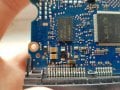
I accidentally sent 12v down the 5v rail and I heard a spark and now it doesn't spin. I removed the 5v TVS diode and bridged what I think was a blown 0ohm resistor but it still won't spin up. Any idea why this isn't powering?

20170730_155943edit.jpg
 
Top