Activating a digital timer using light as a trigger

Irving

Joined Jan 30, 2016
5,120
Personally I'd not use any of those because they are polarised and in this application only C3 is always in the same polarity. I'd stick with the ceramic ones I selected from Digikey.

You still have component level stores in Canada? We have lost almost all of them in the UK with the closure of Maplin and previously Tandy/Radioshack. Fortunately I get next day service with free delivery from RS Components..
 

Thread Starter

flyboy320

Joined Jul 21, 2020
37
You still have component level stores in Canada? We have lost almost all of them in the UK with the closure of Maplin and previously Tandy/Radioshack. Fortunately I get next day service with free delivery from RS Components..
There are not many, but fortunately there is one (sayal.com) that is 10 minutes down the road, had everything I needed except the 0.22uf caps. I made them up out of two 0.1uf and two 0.01uf wired in parallel, looks kinda goofy, but it should work!

As far as the two q2b contacts in your wiring diagram, I assume they connect to each other?
 

Thread Starter

flyboy320

Joined Jul 21, 2020
37
yes, nets with the same name connect together, saves cluttering drawing up...
OK, all wired up, and it sorta works :)
In the picture you attached of my timer's circuit (from post #99), the +1.5v and GND pins are reversed on Q4. When the timer is first powered up, it immediately starts to count up, regardless of the switch position (contacts closed or open). The only time the switch affects anything is when it's moved from open-->closed. So if I put in the timer's battery with the switch in the open position, it starts to count up right away. If I then close the switch, it stops counting, if I then open the switch nothing happens, and then if I close the switch it starts counting again, if I then open it, nothing happens and when I close it, it stops counting. It's like the only position the circuit is sensing is when the switch is moved from open-->closed.
When I have more time I'll re-check my breadboard as it could very well be I've made a mistake in the wiring.
 

Irving

Joined Jan 30, 2016
5,120
Oh bu**er....

You are right, and I've made a boo-boo, sorry - that what happens doing things in the wee small hours...

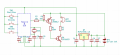
Revised timer circuit...
1596799233491.png
So my original switching circuit was right... and the switches were 1.5v referenced...:rolleyes::mad:

So... how to fix...

Option 1, revert to original solution, swap NPN & PNP transistors around, and reverse all diodes... bit of a faff

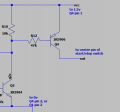
Option 2, add an additional PNP (2N3906) transistor and 47k (or any value 10k - 220k) resistor like this... much simpler

1596800005984.png
 

Thread Starter

flyboy320

Joined Jul 21, 2020
37
So... how to fix...

Option 1, revert to original solution, swap NPN & PNP transistors around, and reverse all diodes... bit of a faff

Option 2, add an additional PNP (2N3906) transistor and 47k (or any value 10k - 220k) resistor like this... much simpler
So after doing option #2, we are getting closer! When I first power on the timer, it doesn't start counting up, which it was doing previously, so that's good. But it still exhibits the behavior that it only recognizes when the switch is moved from open-->closed position. So if I power on the timer (insert battery) with the switch open, it reads 0 and doesn't start counting. If I then close the switch (simulation starting the espresso pump) it starts to count up, so far so good. If I then open the switch (simulating stopping the espresso pump), the timer continues to count up, it doesn't stop counting, which is the desired behavior.

It may well be something I have done wrong in the wiring, so I may start over again to rule that out. If I wanted to do option #1 above, should I follow the circuit diagram in post #75?
 

Thread Starter

flyboy320

Joined Jul 21, 2020
37
Before that, try disconnecting R2 (220k)
If I remove R2, I cannot stop the timer from counting, it starts OK, but no matter the switch position, it keeps counting up.

Also wanted to say thanks for all your time you've put into this, well above & beyond!
 

Thread Starter

flyboy320

Joined Jul 21, 2020
37
There are 3 * 220k, are you sure you removed the right one?
Triple checked, and I am removing R2.

With R2 installed, about 1 in 20 times when I turn on the switch the timer starts and when I turn off the switch, it stops, just as expected, but that only happens like I said about 1 in 20. If I was to start again from scratch, which circuit should I follow?
 

Irving

Joined Jan 30, 2016
5,120
If it works occasionally then it just needs tweaking. Put R2 back.... I noticed in the simulation that the stop was quite sensitive to component values. Would you say the start is reliable though?

And just to confirm, if you start with the coffee switch closure can you stop it with the start/stop button whichever position the coffee switch is in?
 

Thread Starter

flyboy320

Joined Jul 21, 2020
37
If it works occasionally then it just needs tweaking. Put R2 back.... I noticed in the simulation that the stop was quite sensitive to component values. Would you say the start is reliable though?
The start is always reliable (since the only time the timer will start/stop is when the switch is closed, ie. moved from open-->closed). Nothing ever happens to the timer when the switch is moved from closed-->open (which would represent switching the pump motor from running to off).

And just to confirm, if you start with the coffee switch closure can you stop it with the start/stop button whichever position the coffee switch is in?
I'm not quite clear on what your asking here?
 

Irving

Joined Jan 30, 2016
5,120
So if you close the switch to start it, can you stop it with the start/stop button? And similarly, if you switch the switch off and it doesn't stop, can you then stop it with the start/stop button?
 

Thread Starter

flyboy320

Joined Jul 21, 2020
37
So if you close the switch to start it, can you stop it with the start/stop button? And similarly, if you switch the switch off and it doesn't stop, can you then stop it with the start/stop button?
Ah, I see now, I didn't realize you were referring to the start/stop button on the timer, sorry.
Yes to both questions.
 

Irving

Joined Jan 30, 2016
5,120
Good, that means it's timing out correctly, just not triggering when the switch opens...

I'll think on it some more... Food time now...
 

Irving

Joined Jan 30, 2016
5,120
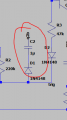
Can I just confirm what value cap you have for C2

1596973120545.png

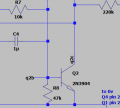
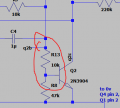
Try putting a 10k resistor in at R13 here... Makes the trigger more reliable...

change this: 1596973277942.png

to this: 1596973653024.png
 

Thread Starter

flyboy320

Joined Jul 21, 2020
37
Unfortunately adding R13 has had no effect, same behavior as before.

I'm not sure how much more time we should spend on this project! I'm certainly happy to try and get it to work, but I don't want you to feel obligated to pursue this any further.

I did notice that when the timer actually does work (switch on - timer starts, switch off, timer stops) it only works when I first power it up by re-inserting the battery (although this only works about 10% of the time and only on the first iteration of switch on-off). Any time after this the timer only starts/stops when the switch is moved to the on position, even if I switch it 50 times in a row.
 

Irving

Joined Jan 30, 2016
5,120
Hmm, weird. I've now got the parts to breadboard this (was a good excuse to update my stock) - watch this space.

I've got plenty of time, I'm still isolating from Covid-19. One of the advantages of being semi-retired and self-employed is I choose what I spend my time on - I work from home much of the time anyway except when I'm teaching or up at the research lab (the former being online for the rest of the year and the latter off limits at the moment).
 

MisterBill2

Joined Jan 23, 2018
27,519
I am thinking that the CMOS IC would be working by now. And the discreet parts circuit needs one extra battery while the CMOS woulld need two extra batteries.
 
Top