AC noise in audio recording

Thread Starter

MikeD_72

Joined Nov 11, 2008
46
I've been doing some audio recording on my laptop (a Dell Inspiron 6400) at home. For a long time now, I've known that I get humm when I run off wall power, and none when I run off battery, so I've always done my recording on battery power. My battery is getting pretty old now, and it's hard to get anything more than about 45 minutes of recording time out of it per charge. I'd like to make some modifications so that I can record noise-free while running on wall power.

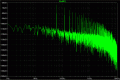
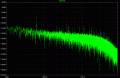
I did a spectral analysis of the background noise while running on wall power and battery.

The analysis for running on wall-power shows the expected peak at 60Hz, as well as harmonics at 120, 180, 240...


Battery power shows no such spikes


What is the best (and safest) way to filter out the 60Hz while using my laptop transformer? Should I add a large electrolytic shunt capacitor somewhere? Is it better to modify the transformer or the motherboard?

Maybe there's a better solution?
 

Attachments

rjenkins

Joined Nov 6, 2005
1,013
It could quite well be ground loop noise, either via a ground connection in the power supply or just capacitive leakage.

The easiest way around this is to use an isolating transformer inline with the mike or line input, to completely break any poissible ground connection.

You can buy commercial ones, or I use the phone line transformers from scrap computer modem boards (which are extremely high quality on 56K modems).
 

Thread Starter

MikeD_72

Joined Nov 11, 2008
46
I don't think this can be a ground loop because I have ac adapters on both my mixer and my laptop. They should provide the necessary isolation from ground, right?
 

rjenkins

Joined Nov 6, 2005
1,013
It could still be capacitively coupled leakage through the power adapters.

The other possibility is just noise on the DC output of the power unit. The simplest test for that may be to try a different power unit (of the same ratings) and see if the noise characteristics change.
 

Thread Starter

MikeD_72

Joined Nov 11, 2008
46
It could still be capacitively coupled leakage through the power adapters.
Can you explain some more? I don't know what you are referring to.

The other possibility is just noise on the DC output of the power unit. The simplest test for that may be to try a different power unit (of the same ratings) and see if the noise characteristics change.
I'm guessing it is the ac adapter on my laptop (based on the charts I posted above). I don't have an equivalent power supply. The next best thing may be to put a scope on the output of my ac adapter, but I don't have access to a scope.

If it is indeed the ac adapter to my laptop, could I filter it out with a large shunt capacitor?
 

Thread Starter

MikeD_72

Joined Nov 11, 2008
46
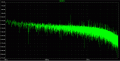
Ok, I took one more sample. This time I was running on AC but I disconnected the audio input line. The 60Hz humm (and harmonics) disappeared completely. So it seems as if I can't blame my laptop wall adapter for the humm.


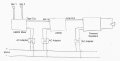
I've attached a rough schematic of my recording setup. Any ideas on getting rid of this humm would be great.


Attachments

Damo666

Joined Aug 25, 2009
19
I might be barking up the wrong tree, but perhaps try some ferrite beads on the audio cable and a small ceramic cap going from audio to ground.
 

davebee

Joined Oct 22, 2008
540
If your AC adapters have non-polarized plugs, you could try plugging them to AC the other way. Try reversing one adapter at a time and see if hum is reduced.

That has worked for me in some cases.
 

rjenkins

Joined Nov 6, 2005
1,013
No, an Audio isolation transformer inline with the mike (or line) input to the PC.

That should break any ground connection and clear the noise.
See my first reply.
 

Thread Starter

MikeD_72

Joined Nov 11, 2008
46
No, an Audio isolation transformer inline with the mike (or line) input to the PC.

That should break any ground connection and clear the noise.
See my first reply.
I figured I already had no ground connections due to the AC adapters, but if one of my adapters happens to be a switched-mode type, do I actually have isolation?

I will go shopping for an audio isolation transformer in a couple of days. Is it better to go to a music/audio store or should I be looking online? Do you have any recommendations on what specifications I should be looking for? I don't want to ruin the frequency response by much. The majority of my recordings are of the piano.
 

rjenkins

Joined Nov 6, 2005
1,013
The problem appears to be capacitive coupling of noise through the power supply, to the ground of the computer (or mixer) rather than a hard-wired ground problem.

One last thing you could try other than the transformer is add a ground wire to the computer - from some metalwork that is definitely grounded like the metal case of something with an ground wire, to a point on the pc metalwork like one of the locking screw positions for the video out or serial / parallel port etc.
If it does not have anything like that, try it to the screen of the audio input plug.

Make sure it does not touch any signal pins on any connector, it could cause severe damage...

It may cure it, or it may make it worse (either way, only while the wire is connected).

If it does not work, one type of audio isolation transformer is sold to be used with car hifi add-on amplifiers to break ground loops. Other than that there are specialist parts, or the DIY version with the Modem card transformer I mentioned earlier.
 

Thread Starter

MikeD_72

Joined Nov 11, 2008
46
One last thing you could try other than the transformer is add a ground wire to the computer - from some metalwork that is definitely grounded like the metal case of something with an ground wire, to a point on the pc metalwork like one of the locking screw positions for the video out or serial / parallel port etc.
I gave this a try but it had no effect on the spectral analysis.

I also tried replacing my condenser mics and mixer with an unpowered voice mic. I did a spectral analysis on that while running on AC power and I got the same 60hz humming as I've shown in the pictures above. I'm really starting to think this is an issue with the laptop ac adapter.

Would it be safe to add a shunt capacitor to the output of the ac adapter to smooth out the dc signal?
 
Top