8051, addition of 32-bit numbers

Thread Starter

PG1995

Joined Apr 15, 2011
832
Hi

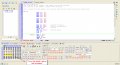
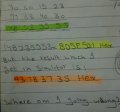
The result I'm getting on the simulator is different from the one which I get when I do the problem by hand. What's wrong? Please help me. Thank you.


Rich (BB code):
;Write a program to add two 32-bit numbers stored in RAM locations.

;Let's assume that the numbers are stored at RAM location 40-43H and 50-53H respectively.

ORG 0H
        MOV 40H, #23
        MOV 41H, #15
        MOV 42H, #60
        MOV 43H, #70

        MOV 50H, #30
        MOV 51H, #40
        MOV 52H, #63
        MOV 53H, #77

        MOV R0, #40H    ;pointer of bank 0
        MOV R1, #60H    ;result storage bank 0
        MOV R2, #4    ;counter
        SETB RS0
        MOV R1, #50H    ;pointer bank 1
        CLR RS0
        CLR C 

    REPEAT:    MOV A, @R0
        SETB RS0
        ADDC A, @R1
        INC R1
        CLR RS0
        MOV @R1, A
        INC R0
        INC R1
        DJNZ R2, REPEAT

        JNC EXIT
        INC @R1

    EXIT:    NOP
        SJMP $

END
 

Attachments

absf

Joined Dec 29, 2010
1,968
If you look at your simulator closely, you'd find that your numbers in decimal are already converted to Hex by the assembler before doing the addition.

70 60 15 23 dec -> 46 3c 0F 17 hex
77 63 40 30 dec -> 4D 3F 28 1E hex

In 8051, if you want to do BCD addition, you have to load the numbers in Hex (0-9 only) and make use of the AC flag (Auxiliary Carry Flag) to adjust any carry from bit 3 to bit 4.

Allen
 

Thread Starter

PG1995

Joined Apr 15, 2011
832
If you look at your simulator closely, you'd find that your numbers in decimal are already converted to Hex by the assembler before doing the addition.

70 60 15 23 dec -> 46 3c 0F 17 hex
77 63 40 30 dec -> 4D 3F 28 1E hex

In 8051, if you want to do BCD addition, you have to load the numbers in Hex (0-9 only) and make use of the AC flag (Auxiliary Carry Flag) to adjust any carry from bit 3 to bit 4.

Allen
Hi Allen

I'm sorry but I don't get your point. I'm not doing BCD addition. I'm aware that the assembler automatically converts the decimal numbers into hex numbers but I'm still not able to see why I'm getting wrong result. Could you please elaborate a little more? Thank you.

Regards
PG
 

absf

Joined Dec 29, 2010
1,968
But 70 60 15 23 dec <> 46 3C 0F 17 hex. Check it out with a scientific calculator.

Using a simple example here to substitute into your program:
12 34 dec -> 41H=0C 40H=22

Now convert 0C22 hex back to decimal again would give 3106dec and NOT 1234dec.

And if you convert 1234 to hex using a calculator it should give you 4D2 and not C22.

Hope the explanation is clear now.

Allen
 

Thread Starter

PG1995

Joined Apr 15, 2011
832
But 70 60 15 23 dec <> 46 3C 0F 17 hex. Check it out with a scientific calculator.

Using a simple example here to substitute into your program:
12 34 dec -> 41H=0C 40H=22

Now convert 0C22 hex back to decimal again would give 3106dec and NOT 1234dec.

And if you convert 1234 to hex using a calculator it should give you 4D2 and not C22.

Hope the explanation is clear now.

Allen
Thank you, Allen. :)

Let me rephrase what you have already mentioned above. When we store 12D into memory location 41H, it becomes 0CH, and storing 34D into memory location 40H would make it 22H. In short, 12 34 <=> 0C 22. But the scientific calculator doesn't give the same result; the result we get is: 1234 <=> 4D2.

Well, why don't we get same results in both cases?! :confused: Could you please tell me the reason?

Regards
PG
 

absf

Joined Dec 29, 2010
1,968
Thank you, Allen. :)

Let me rephrase what you have already mentioned above. When we store 12D into memory location 41H, it becomes 0CH, and storing 34D into memory location 40H would make it 22H. In short, 12 34 <=> 0C 22. But the scientific calculator doesn't give the same result; the result we get is: 1234 <=> 4D2.

Well, why don't we get same results in both cases?! :confused: Could you please tell me the reason?

Regards
PG
This has something to do with the number weight system...

if you break 1234D into 12D & 34D in decimal system, it is same as saying
12*100 + 34*1 = 1200 + 34 = 1234

But the hex equivalent of "12" which is 0CH & "34" as 22H has the value of
0C*100H + 22*1H = 12*256D + 34*1D = 3106

Allen
 

Thread Starter

PG1995

Joined Apr 15, 2011
832
So, the conclusion of this discussion is that when doing addition problem one should should hex numbers and not decimal. Right? For example, if I had input numbers, then there wouldn't be any contradictory results. Thank you.

Best wishes
PG
 

absf

Joined Dec 29, 2010
1,968
So, the conclusion of this discussion is that when doing addition problem one should should hex numbers and not decimal. Right? For example, if I had input numbers, then there wouldn't be any contradictory results. Thank you.
Only in multiple precision numbers that used up more than one byte in a 8-bit mpu/mcu. If you are able to enter 32 bit number on a 32 bit machine in one instruction. there should be no problem.

Allen
 
Top