
 Facebook
 Google
 GitHub
 Linkedin

I'm an EE student at the University of Georgia who was assigned to a senior design project working on integrating the navigation app Waze with an existing Continental augmented reality heads-up display. Upon receiving the HUD unit from our Toyota sponsor my team decided to use the Continental mirror system (magnifies the LCD and projects to windshield) and the high powered back lit LCD while building a new control board.
We are having troubles connecting the 40 pin graphical LCD to a Raspberry Pi as none of us have experience with such a large LCD. Provided are some pictures. Anyone that could point us in the right direction would be great.
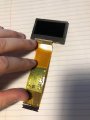
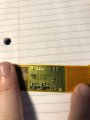
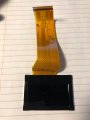
We are having troubles connecting the 40 pin graphical LCD to a Raspberry Pi as none of us have experience with such a large LCD. Provided are some pictures. Anyone that could point us in the right direction would be great.




