23LC1024 RAM

Thread Starter

q12x

Joined Sep 25, 2015
2,227
Her you have I fix your circuit and the code.
My friend mister @Jony130.
Can you explain in normal words, what you just did? I looked over your code and is more advanced than what I know.
Or at least send me a tutorial link where they explain the thing you just did. But I prefer you do it since it is a dedicated code here.
It's story time, explain as much as you can and in depth as you wish. Im all ears and eyes, master !
Thank you.
 

Thread Starter

q12x

Joined Sep 25, 2015
2,227
Well, the whole shabang. I mean, I did clock the pin manually, I did send the corresponding bits after looking into the datasheet and following exactly their specifications, I did write and read using specific starting code, as the datasheet shows (but dont tell). How did you figure out it needs a bit mask and the rest of your code that made it work? Thats what I want to know. What was your logic and how did you come to this solution? Tell me all your steps and mindset.
Thank you.
 

Jony130

Joined Feb 17, 2009
5,598
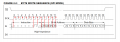
Your biggest mistake was that you didn't notice that you need to "set" the SI pin during or just after the negative CLK edge.
SRAM.PNG
Because SRAM chip is reading the SI pin value during positive CLK edge.

Thus this sequence is wrong

C++:
//-------------1st: 8bit initialization-------------
  //this is 00000010
  for (int i = 0; i < 6; i++) {
    digitalWrite(clk, 1);
    digitalWrite(wpin, 0); // only 6 0's
    digitalWrite(clk, 0);
  }
  digitalWrite(clk, 1);
  digitalWrite(wpin, 1); // 7th bit
  digitalWrite(clk, 0);
  digitalWrite(clk, 1);
  digitalWrite(wpin, 0); // 8th bit
  digitalWrite(clk, 0);
The SRAM chip will not read 0b00000010 but 0b00000001. And this is not the WRITE instruction but a Write Mode Register instead.


Thus, the correct sequence should look like this:
C++:
//-------------1st: 8bit initialization-------------
  //this is 00000010
  for (int i = 0; i < 6; i++) {
    digitalWrite(wpin, 0); // only 6 0's
    digitalWrite(clk, 1);
    digitalWrite(clk, 0);
  }
  digitalWrite(wpin, 1); // 7th bit
  digitalWrite(clk, 1);
  digitalWrite(clk, 0);
  digitalWrite(wpin, 0); // 8th bit
  digitalWrite(clk, 1);
  digitalWrite(clk, 0);
And some delays may be needed to meet the timing requirement ( Data Setup Time and Data Hold Time ). Or to better "see" what is going on the oscilloscope.
We can do the same thing for the address and the data that we want to store in SRAM. But the whole process can be automated.
First, we noted that the data read by SRAM on SI pin needs to be transferred - MSB first, and LSB last just like in serial in shift register.
Because we need to start from MSB we need to use the bit mask at the MSB 0b10000000 = 0x80 (in HEX) and AND-it with the data we want to send via SI pin.
Thus, in the first step we have:
C++:
//-Data to send-------Ob11100111
//-bitmask------------0b10000000 
//bit bitwise AND & ---------------
//---resoult----------0b10000000 
// if the result is 1 we set SI pin and clear the SI pin when 0
Next, we shift right by one the bitmask because now we want to send 7th bit, after the shift we end up with this:
C++:
//-Data to send-------Ob11100111
//-bitmask------------0b01000000
//bit bitwise AND & ---------------
//---resoult----------0b01000000
// if the result is 1 we set SI pin and clear the SI pin when 0 


// shift right the bit mask by one 
//-Data to send-------Ob11100111
//-bitmask------------0b00100000
//bit bitwise AND & ---------------
//---resoult----------0b00100000
// if the result is 1 we set SI pin and clear the SI pin when 0
And we need to do this for every single bit, so we need a loop.
C++:
for(int i = 0; i < 8; i++){
    uint8_t bit_mask = 0b10000000;
    if(data_to_send & bit_mask) set_the_SI_pin_High;
    else set_the_SI_pin_LOW;
    bit_mask = bit_mask >> 1;
    set_the_CLK_pin_High;
    set_the_CLK_pin_LOW;   
}
Now we can read the data from SRAM. We can send the "instruction READ" and the "staring address" in the same way as we did for WRITE instruction.
But after that, we can read from SRAM so we need to "set" the SO pin as INPUT in our uC. So, we need to check the SO pin state after a positive CLK edge.
And if the state at SO pin is HIGH we set the corresponding bit to HIGH state as well. Because again, the transferred data is from -->MSB to --> LSB.
For example, if we received HIGH state at the 6'th bit, we need to set the 6'th bit in the result variable as well.
Therefore we can again use bitmask 0x80 and this time bitwise OR operation. So that we do not influence previously received bits.
C++:
for(int i = 0; i < 8; i++){
    uint8_t bit_mask = 0x80;
    set_the_CLK_pin_High;
    if(SO_pin_HIGH) received_data |= bit_mask; // Set the bit if SO pin HIGH
    else received_data &= ~bit_mask; // Clear the bit if SO pin LOW
    bit_mask = bit_mask >> 1;
    set_the_CLK_pin_LOW;
}
Try to deduct how setting and clearing a bit works by yourself.

C++:
//------- set bit 5 ---
//----------  7 6 5 4 3 2 1 0
//----------------------------
//---- data = 1 0 0 0 0 1 0 1
//------OR --------------------     
//-----mask   0 0 1 0 0 0 0 0
//-----------------------------
//result -----1 0 1 0 0 1 0 1
As you can see we set the 5'th bit without affecting other bits.

Or if we now want to clear the 5'th bit we are going to use this trick.
C++:
//----mask---- 0 0 1 0 0 0 0 0
//----~mask--- 1 1 0 1 1 1 1 1
//------------------------------
//------------------------------     
//----data     1 0 1 0 0 1 0 1
//----~mask    1 1 0 1 1 1 1 1
//-----AND-----------------------     
//    result   1 0 0 0 0 1 0 1
As you can see we managed to clear the specific bit without affecting other bits. And this is what we want.
 

Thread Starter

q12x

Joined Sep 25, 2015
2,227
Mister @Jony130 , just WOW ! I am sincere here and I tell you that I understand part of your explanation simply because this is brand new to me. This shifting and masking bits in one package. I can see you did explain the problem and more.
From my perspective, this code right here is an exotic code, Why? because, again, from my perspective, I never had to use it in my routine c# code or other languages before(not even in my (too little) assembler times). I am somewhat knowledgeable of these things, but from very afar, as a very general information, and not at all up close and personal as it is right now. Fantastic explanation and I really appreciate your effort. I really like how you did it. You left me with my mouth open in admiration. Really, fantastic job. And another reason why I am so bad at it is because im not doing it routinely (every day), like some other people are, possibly you. It looks like you are. Thats why for me is a big wow of admiration. I really like the fact that you actually used the osciloscope into debuging the code. I only draw this conclusion from seeing that osciloscope in the proteus save file. I also admire your code skills because you walked with my code notations and not starting to create your own parallel code, with different names and notations. It was easy for me to follow your code this way.
For me to get good at this particular --shifting and masking bits -- I should exercise them more. Its the only thing I can think that will improve me. It's a niche/direction in programming and a very specialized one, applicable only for specific area - at least is how I see it. Do correct me if im wrong. I find it very interesting, but I was always in the past, be afraid of going deeper, until recently with what I just tried ... but with your help, I can see further into it and Im very glad you made this correction that worked, for me.
You are my friend forever.
 

Jony130

Joined Feb 17, 2009
5,598
I'm glad that I could help. As for my knowledge, my knowledge is also very limited because I'm the hobbies only. I do not have any formal education in electronics or in programming. I am self-taught.
 

Thread Starter

q12x

Joined Sep 25, 2015
2,227
I'm glad that I could help. As for my knowledge, my knowledge is also very limited because I'm the hobbies only. I do not have any formal education in electronics or in programming. I am self-taught.
Same here as well. Im an artist. Im very impressed you made it worked. Never forget that.
 
Top