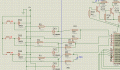
10 x 5 led matrix using pic18f2550

Thread Starter

anoopmb25

Joined Jan 15, 2011
17
thanx for your replies actually i got how to scroll it, i just added two spaces before first character so scrolling start from the left thanx again for your replies

actually i made this project for my bike and it is interupt driven and wish to control the brightness via pwm

Say for example,
total 3 interrupts
one for breaklight and other two for turning indicator
when the circuit is powered it is in park light mode that is all leds on with less brightness
on default no power supply given to circuit and working is given as follows

when park switch is on only power supply goes to circuit without any interrupts and it is in low brightness mode

on break signal power supply and respective interrupt is gone to circuit and same for turning signal

can u help me how to use pwm control and interrupt priority

thanx again
 

spinnaker

Joined Oct 29, 2009
7,830
Great!


There is an article on PWM as a sticky at the top of this forum. It is what I used and I got PWM working pretty easily.


Do you want it for this project? Don't you already turn on each row one at a time? If so you could just slow that down.

Would a simple sample to blink one led using an interrupt work for you? If so I could probably write something for you. It is pretty easy. It might take me till the weekend. Let me know.


I guess you ride bicycles? So do I. I have toured through Italy and small parts of Austria and Switzerland. I have also ridden the California coast.
 

Thread Starter

anoopmb25

Joined Jan 15, 2011
17
thanx

i just want to reduce brightness not wish to use pwm i think its the way to reduce brightness

by interrupt i can turn on any led on the matrix

great to hear about your rides but here in India its not possible to take long rides high job pressure here starts from the childhood so....... family depends on their son and so ..........
 

spinnaker

Joined Oct 29, 2009
7,830
thanx

i just want to reduce brightness not wish to use pwm i think its the way to reduce brightness

by interrupt i can turn on any led on the matrix

great to hear about your rides but here in India its not possible to take long rides high job pressure here starts from the childhood so....... family depends on their son and so ..........

What I was asking on the interrupt sample, I do not have access to your hardware. What I can do is write a program to toggle one output using interrupts. Do you think you can then apply that sample to your code?

And there is no need to PM me to let me know you posted. I get an automatic notification. :)
 

Thread Starter

anoopmb25

Joined Jan 15, 2011
17
actually i dont know how to use interupt main problem is configuring the interupt pins
in c18 compiler i can do it but not in hitech 18 compiler [ __config(n,x) }
i wish to use hitech
lets just start from begining

how can i configure timer0 interupt using internal 8 bit oscillator 1:4 prescaler and 8mhz processor speed in hitech

please give me suggestions

am not well in English so please forgive me for problems
 

spinnaker

Joined Oct 29, 2009
7,830
Sorry I have no experience with HiTech and really don't have the time to learn. I am trying to teach myself assembler right now.

But I can probably put a small demo together to blink an led with an interrupt. Let me know if you want that.

You should download this software
http://pictimer.picbingo.com/

It will write the code for you to setup the timer for the delay that you want. It will not do the interrupt routine just set the registers for the time you want.

It writes it in MikroC but it is not too hard to convert.
 

spinnaker

Joined Oct 29, 2009
7,830
Here is code that blinks LEDs off and on using an interrupt. You may need to adjust the code for your circuit configuration, PIC type, clock speed etc.

Rich (BB code):
#include "p18f45k20.h"


#pragma config FOSC = INTIO67
#pragma config WDTEN = OFF, LVP = OFF, MCLRE = OFF


void Timer0_Init(void);
unsigned char count;
unsigned char LightsOn = 0;

void InterruptServiceLow(void);


// Low priority interrupt vector

#pragma code InterruptVectorLow = 0x18
void InterruptVectorLow (void)
{
  _asm
    goto InterruptServiceLow //jump to interrupt routine
  _endasm
}

/** D E C L A R A T I O N S *******************************************/
#pragma code    // declare executable instructions


void main (void)
{


    count = 0;

     Timer0_Init();              // now enables interrupt.

    // Set up switch interrupt on INT0
    INTCON2bits.INTEDG0 = 0;    // interrupt on falling edge of INT0 (switch pressed)
    INTCONbits.INT0IF = 0;      // ensure flag is cleared
    INTCONbits.INT0IE = 1;      // enable INT0 interrupt
    // NOTE: INT0 is ALWAYS a high priority interrupt

    // Set up global interrupts
    RCONbits.IPEN = 1;          // Enable priority levels on interrupts
    INTCONbits.GIEL = 1;        // Low priority interrupts allowed
    INTCONbits.GIEH = 1;        // Interrupting enabled.


    TRISD = 0;     // PORTD bit 7 to output (0); bits 6:0 are inputs (1)

    LATD = 0;        // Set LAT register bit 7 to turn on LED
            

    while (1);


}


#pragma interruptlow InterruptServiceLow// "interruptlow" pragma for low priority
void InterruptServiceLow(void)
{


    // Check to see what caused the interrupt
    // (Necessary when more than 1 interrupt at a priority level)

    // Check for Timer0 Interrupt
    if  (INTCONbits.TMR0IF)
    {
        INTCONbits.TMR0IF = 0;          // clear (reset) flag
    
                    
        if (LightsOn)
        {
            LATD = 0;
            LightsOn = 0;
            
        }
        else
        {
            LATD = 255;
            LightsOn = 1;                
        }

    }

    
}


void Timer0_Init(void)
{
    // Set up Interrupts for timer
    INTCONbits.TMR0IF = 0;          // clear roll-over interrupt flag
    INTCON2bits.TMR0IP = 0;         // Timer0 is low priority interrupt
    INTCONbits.TMR0IE = 1;          // enable the Timer0 interrupt.
    // Set up timer itself
    T0CON = 0b00000001;             // prescale 1:4 - about 1 second maximum delay.
    TMR0H = 0;                      // clear timer - always write upper byte first
    TMR0L = 0;
    T0CONbits.TMR0ON = 1;           // start timer
}
 

Thread Starter

anoopmb25

Joined Jan 15, 2011
17
ok thanx for your help very very much thanx

and hitech working by changing config settings now i can write any thing and it wil scroll

now i have problems with reading input pins (RA0, RA1, RA2)

am supplying voltage to this pins using 5.1v zener diode and pull up resistors from 12v

how can i read it ?
by if statement or by interrupt ?

i used the following code in main function

while(1)
{

if (PORTA & 0b00000001 != 0)
{

ScrollText(" STOP" );

}
if (PORTA & 0b00000010 != 0)
{
ScrollText(" <<<" );

}
if (PORTA & 0b00000100 != 0)
{

ScrollTextRight(">>> " );

}
}


but it dont worked is it correct?

or how can i use interupt for this?

pls help me ?
 

spinnaker

Joined Oct 29, 2009
7,830
I already posted an example of how to do a timer interrupt.


As far a input. What kind of input? Analog? Digital?

I don't see any code that has anything to do with input.
 

Thread Starter

anoopmb25

Joined Jan 15, 2011
17
this is my code sir


Rich (BB code):
void main(void)
{


OSCCON=0xf0;
T0CON=0xC1;
TMR0H=0;
TMR0L=240;
INTCON=0;
INTCON2=0;
INTCON3=0;
PIR1=0;
PIR2=0;
PIE1=0;
PIE2=0;
IPR1=0;
IPR2=0;
IPEN=0;
ADCON0=0;
ADCON1=0x0f;
ADCON2=0;


T1CON=0;
T2CON=0;
T3CON=0;

SSPCON1=0;
SSPCON2=0;
RCSTA=0;
TRISA=0b00000111;
TRISB=0;
TRISC=0b10000000;

CCP1CON=0,
CCP2CON=0;

SPBRG=51;
TXSTA=0x22;
RCSTA=0x90;
BAUDCON=0x48;
SPBRGH=0;
POR=1;
Clear();
IPEN=1;
PORTA = 0b00000000;
PORTB = 0b00000000;
PORTC = 0b00000000;
GIEH = 1;
GIEL = 1;
//INTCONbits.PEIE = 1;
TMR0IE = 1;

    while(1)
    {

if (PORTA & 0b00000001 != 0)
{

ScrollText("   STOP" );

}
if (PORTA & 0b00000010 != 0)
{

ScrollText("   <<<" );

}
if (PORTA & 0b00000100 != 0)
{

ScrollTextright("   >>>" );

}
    }
}
but it dont worked

wat is the difference of analog input and digital input

.am attached my circuit to pic input

pls help me
 

Attachments

Last edited:

spinnaker

Joined Oct 29, 2009
7,830
What are your inputs????? A switch setting? A battery level? what?

Do a search on analog and digital. These are very basic terms.
 
Top