Shapes to grid align in LTSpice

Thread Starter

engr_david_ee

Joined Mar 10, 2023
362
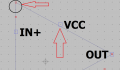
How do we draw the line aligned to the grid when drawing symbols in LTSpice ? I mean how can we draw the line or other shapes between the grid points ? I have attached a picture in which the top left corner is not ended up at the grid point. How can we change the size of the grid ? and how can we align the shapes to the grid ?
 

Attachments

Papabravo

Joined Feb 24, 2006
22,083
In the symbol editor, you grab the corner and "drag" it to the grid point. IIRC you might have to use the hotkey shortcut for "Drag", F8 perhaps in LTspice 17 and "S" in LTspice 24
 

Thread Starter

engr_david_ee

Joined Mar 10, 2023
362
I tried that to grab the corner and drop to the grid point but the corner wit red circle end point can also drop to any location on and off the grid point. I would like it to drop only at the grid point. I am using LTSPICE XVII which is version 17. I tried F8, it does not work.
 

Papabravo

Joined Feb 24, 2006
22,083
I tried that to grab the corner and drop to the grid point but the corner wit red circle end point can also drop to any location on and off the grid point. I would like it to drop only at the grid point. I am using LTSPICE XVII which is version 17. I tried F8, it does not work.
I tried it in both 17 and 24 and it works for me in both cases. It doesn't matter if the initial intersection of lines is on or off the grid; I can pick it up and drag it anywhere. I don't understand what is happening when you say it doesn't work. Are you saying you can't pick up the intersection of two line or you can't move the intersection of two lines, or you can't drop it where you wany, on a grid point.
 

eetech00

Joined Jun 8, 2013
4,705
How do we draw the line aligned to the grid when drawing symbols in LTSpice ? I mean how can we draw the line or other shapes between the grid points ? I have attached a picture in which the top left corner is not ended up at the grid point. How can we change the size of the grid ? and how can we align the shapes to the grid ?
Sometimes an angled line cannot be totally aligned to the grid. Only lines at 0,45,90 degrees can be aligned with grid points along its entire length. You are probably "moving" the line rather than "dragging" it. "Drag" mode will allow the pointer to grip and move only one end of a line (stretching the line as its endpoint is dragged). This will allow you to reposition the endpoint so the line crosses a grid point. It's easier, when drawing an opamp symbol, to place the pin, then draw a straight line from the pin to the symbol body. LTspice drawing tools are primitive.
 

Papabravo

Joined Feb 24, 2006
22,083
Sometimes an angled line cannot be totally aligned to the grid. Only lines at 0,45,90 degrees can be aligned with grid points along its entire length. You are probably "moving" the line rather than "dragging" it. "Drag" mode will allow the pointer to grip and move only one end of a line (stretching the line as its endpoint is dragged). This will allow you to reposition the endpoint so the line crosses a grid point. It's easier, when drawing an opamp symbol, to place the pin, then draw a straight line from the pin to the symbol body. LTspice drawing tools are primitive.
I did notice the difference in operation between "Drag" and "Move" which is why I suggested using "Drag"
 

Thread Starter

engr_david_ee

Joined Mar 10, 2023
362
Thanks for your reply. I just draw a line to practice snap to grid or alignment to grid. In order to have each end of the line on the grid point, I use drag option to drag each end of the line to the grid. Same apply to the other end. Yes, it works.

There are visible grid points and also quantized sub-grid which is not visible. So there is no way to change the size of visible grid points and also non-visible quantized sub-grid ?
 
Last edited:

Papabravo

Joined Feb 24, 2006
22,083
Thanks for your reply. I just draw a line to practice snap to grid or alignment. In order to have each end of the line on the grid point, I use drag option to drag each end of the snap to the grid. Same apply to the other end. Yes, it works.

There are visible grid points and also quantized sub-grid which is not visible. So there is no way to change the size of visible grid points and also non-visible quantized sub-grid ?
I don't think so. If you look at the text of a ".asy" file, you will quickly realize that there are 16 "sub-grid" points between the visible grid points in the symbol editor. It is an absolute coordinate system with no connection to any measurement reality. This is radically different than the situation with PCB or chip layout tools. In those cases, there must be a relationship between grid points and actual measurements.
 
Top