plc programing

Thread Starter

genelation

Joined Oct 17, 2009
1
Hi Guys

I am an electrician for 23 yrs but i have never done any plc programing. I would like to learn how to do this. I am trying to program a eaton plc but of coarse they do not write program for but i need to know how to get started. the program language seems like greek to me. What is the easiest way to learn thia stuff. keep in mind i dont know anything about this stuff.
I am a master electrician but this is a different world. help please.
 

JDT

Joined Feb 12, 2009
657
Well, the best way for anything like this is to dive in and have a go!

You need a PLC, the programming software, a cable to connect your PC to the PLC and the programming manual. Hopefully that will have some simple examples to get you started.

Get a bank of about 8 switches that you can connect to some inputs. The outputs usually have LED's so you can see what they are doing.

Think of a simple application. Traffic lights are a typical example. They switch in sequence. Some of your inputs will represent vehicle detector pads in the road. Other inputs might simulate a pedestrian crossing request button for example.

Write down what you want it to do before you start. Most PLC's can be programmed in "relay" ladder logic where in software you are simulating a circuit. If you have problems try Googling for the answer.

More advanced PLC programs will use a "State Machine" approach. This can be done easily in ladder logic.
 

bluebrakes

Joined Oct 17, 2009
253
writing in ladder logic is probably going to be the easiest way to start. Especially considering its a visual approach.

Some companies actually do courses, such as siemens, allen&bradley, kuka. Might be worth contacting them?
 
hi all...im currently trying to write a program in sfc on a mitsubishi fx3u plc....i am havin trouble writing it....my difficulty is where i have to hold on an output through to the next step...do i need a hold on or latching marker?i am setting my markers but as it goes through the steps it just drops out....help would be greatly appreciated...
 

MaxHeadRoom

Joined Jul 18, 2013
30,665
What instructions are you using? A SET RST or using just latching an output?
Nothing happens until you run the program and energise the latch.
Can you post an example rung?
Max.
 
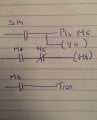
im using ...... ld s14--------------pls m5
|
|___(y4)
pls m0-------not m5--------------(m6)


ld m6----------------------------------tran.

my m0 is for the manual switching,sorry about the example but its all i could come up with....im doing an exam you see....i have the progam i need to design here if that is any good to you?thanks.....
 

lightingman

Joined Apr 19, 2007
374
The ladder logic is very easy to pic up. I was given a heap of Allen Bradley PLC's. I just sat down with the software (RSlogix 500 and PanelBuilder 32). I picked it up in an evening. There is a lot of info on the web.

Daniel.
 

MaxHeadRoom

Joined Jul 18, 2013
30,665
The ladder logic is very easy to pic up. I was given a heap of Allen Bradley PLC's. I just sat down with the software (RSlogix 500 and PanelBuilder 32). I picked it up in an evening. There is a lot of info on the web.
Daniel.
Mitsubishi has different commands to AB.
Max.
 

MaxHeadRoom

Joined Jul 18, 2013
30,665
im using ...... ld s14--------------pls m5
|
|___(y4)
pls m0-------not m5--------------(m6)


ld m6----------------------------------tran.

my m0 is for the manual switching,sorry about the example but its all i could come up with....im doing an exam you see....i have the progam i need to design here if that is any good to you?thanks.....
You do realize the PLS is only on for one scan, are you trying to create a latch, I assume you have the programming manual, here is one with examples of each instruction.
http://www.rawsons.com.au/_admin/Us.../jy997d16601e Fx3-ProgrammingManual(1of3).pdf
Max.
 

MaxHeadRoom

Joined Jul 18, 2013
30,665
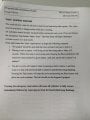
This looks like a typical application of P.B.'s that are called Palm Buttons, these are used where the operator has to press two buttons simultaneously in order to start a process, although these can be obtained with the features already present, when using ordinary N.O. buttons the catch is to program to prevent an operator from laying something on the PB or other means of retaining one while just using a single hand to operate the procedure.
In the above example, the P.B. also requires a step to the next procedure.
I have programmed this type of operation, IIRC it was to set a short timer whenever the first button is pressed then the second button has to be pressed within the alloted time, if the timer is kept timed out, (the PB is covered) then the cycle will not activate.
You could interpret the required example to be a failure of fulfilling the requirement to avoid the safety feature as it does not mention re-initiating the 'Hand' button, it should say 'Pushing the hand button' instead of 'Holding the Hand button' , otherwise the Hand Start button would seem redundant?
Max.
 
yeah its not worded the best....i have no issue with the two push buttons i was using them to pulse m0 and bring the programme through the steps....its just the part where i have to keep the output latched through two steps that i cant figure out....
 

strantor

Joined Oct 3, 2010
6,875
yeah its not worded the best....i have no issue with the two push buttons i was using them to pulse m0 and bring the programme through the steps....its just the part where i have to keep the output latched through two steps that i cant figure out....
Try a SET coil instead of an ordinary coil. It will stay on until, in your 2nd (or 3rd, or 18th, or whatever) step, you reset it.
http://www.hiflexonline.nl/products/mitsubishi/plc/documentatie/FX3_Programming_manual.pdf
see section 7.13
 

MaxHeadRoom

Joined Jul 18, 2013
30,665
Also as there is no confirmation of completion of each stage, it could be assumed when the Step button is released, either a internal coil could be latched or the SET/RST as both of us mentioned, this could be done with a trailing edge function.
It is a very poor example of a real world problem, where this would bring up many questions as to an overall function.
Max.
 
Last edited:
thanks lads....i got over the holding on of the coil by setting my output and having my output put in each step until the step where i needed to reset it......i also have to stop the program via a stop button and have the program stop and then continue from where it left off via the same start button....any tips on this?????
 

MaxHeadRoom

Joined Jul 18, 2013
30,665
Depends what you mean by 'Stop the program'? it is stepped purely manually, no auto function.
So far you only have a Hand and a Step button, do you mean use two extra buttons, e.g. a Stop and a Start?, which 'same' start button?
Max.
 
Top